Activate Croppy Pro
Try batch cropping free, then unlock Croppy Pro with a license key. Manual crop is always free.
Your free trial
Every Figma account gets 10 free Pro runs, with up to 20 output images in each run. A banner at the top of Croppy shows how many runs you have left.

- A run is used when a batch Insert into Figma or Export ZIP finishes. Cancelled or failed runs are not counted.
- If your run would make more than 20 images, Croppy tells you before you start. Pick fewer layers or sizes, or unlock Pro.
- Manual crop never uses a trial run and keeps working after the trial ends.
- Trial runs are counted per Figma account on each device. They are not stored in your Figma files, so they do not pass to collaborators.
Buy Croppy Pro
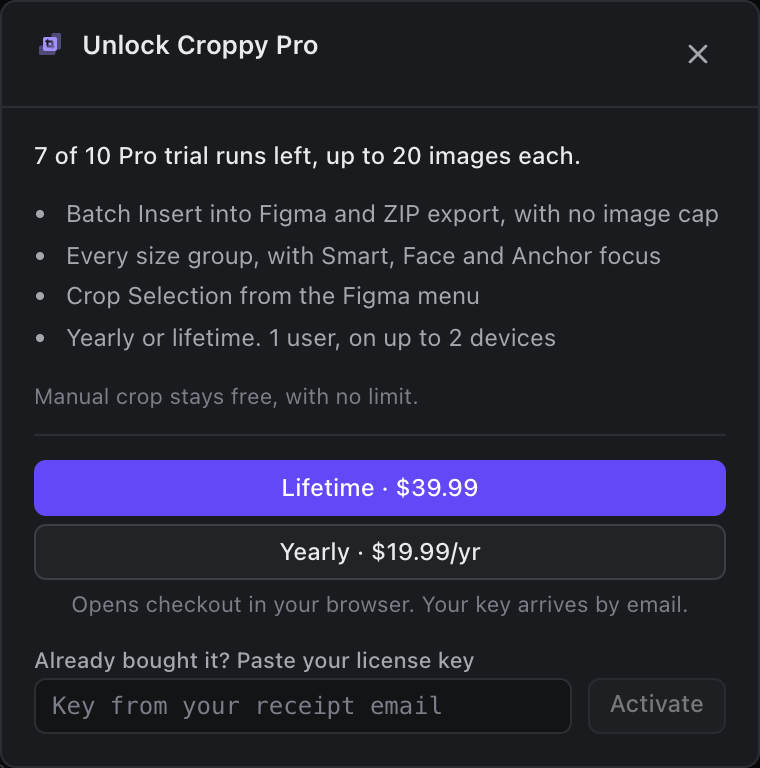
- In Croppy, click Unlock Pro in the trial banner. Once your trial is used up, the main button also changes to Unlock Croppy Pro.
- Choose Lifetime · $39.99 (one payment) or Yearly · $19.99/yr. Prices are in US dollars.
- Checkout opens in your browser. Croppy Pro is sold through Dodo Payments.
- Your license key arrives by email after you pay.
Both plans unlock the same features for 1 user on up to 2 devices. Compare them on Free vs Pro.
Activate your license key
- Open Croppy and click Unlock Pro.
- Paste the key from your receipt email into Already bought it? Paste your license key.
- Click Activate. Croppy confirms with "Croppy Pro is unlocked. Thank you!" and a Pro badge appears next to the Sources and Review tabs.
Use Pro on another device
A key can be active on 2 devices at once. To move it to a third device, free one up first:
- On the device you no longer need, open Croppy.
- Click the Pro badge.
- Choose Remove license from this device.
- Activate the key on your new device.
Staying active
- Croppy checks your license with Dodo Payments when it opens, at most once a day.
- Pro keeps working offline for 7 days after the last successful check. After that, connect to the internet and click Check license in the banner.
- If a yearly plan ends or a key is refunded, Croppy removes the license from the device at the next check. Renew to keep Pro.
Activation problems are covered in Troubleshooting.